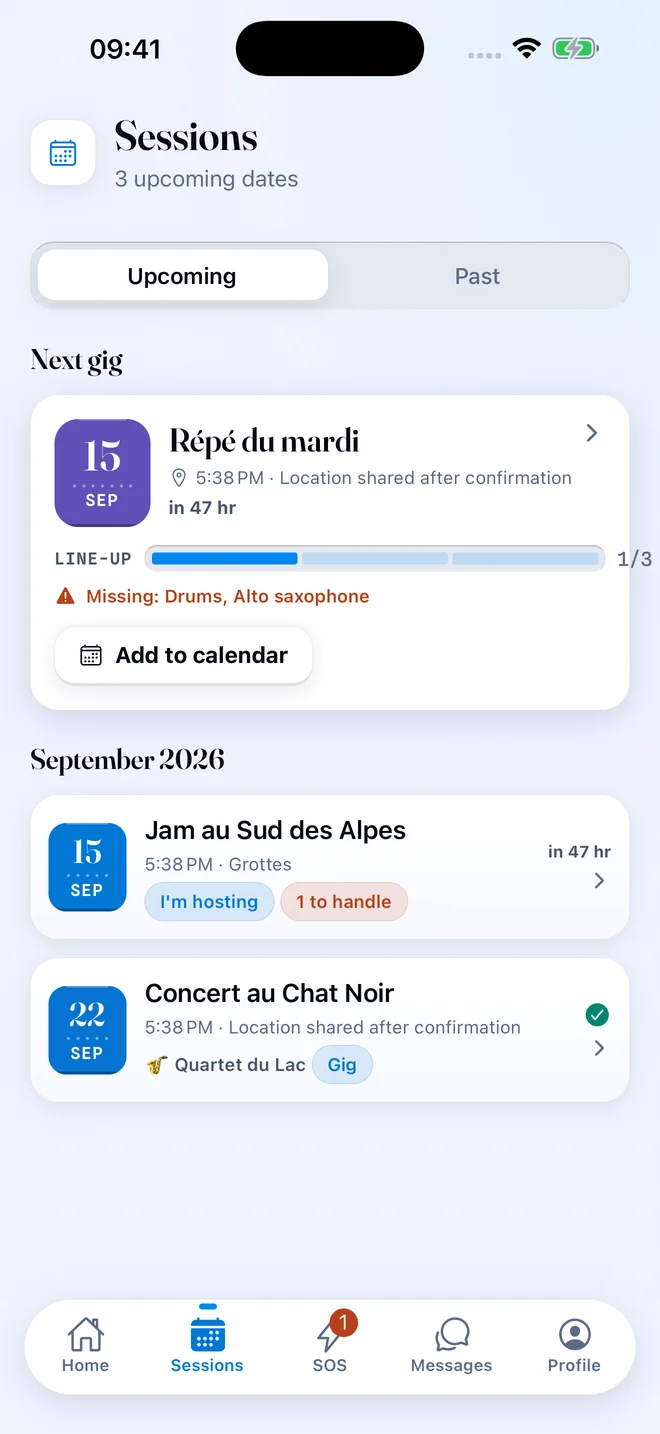
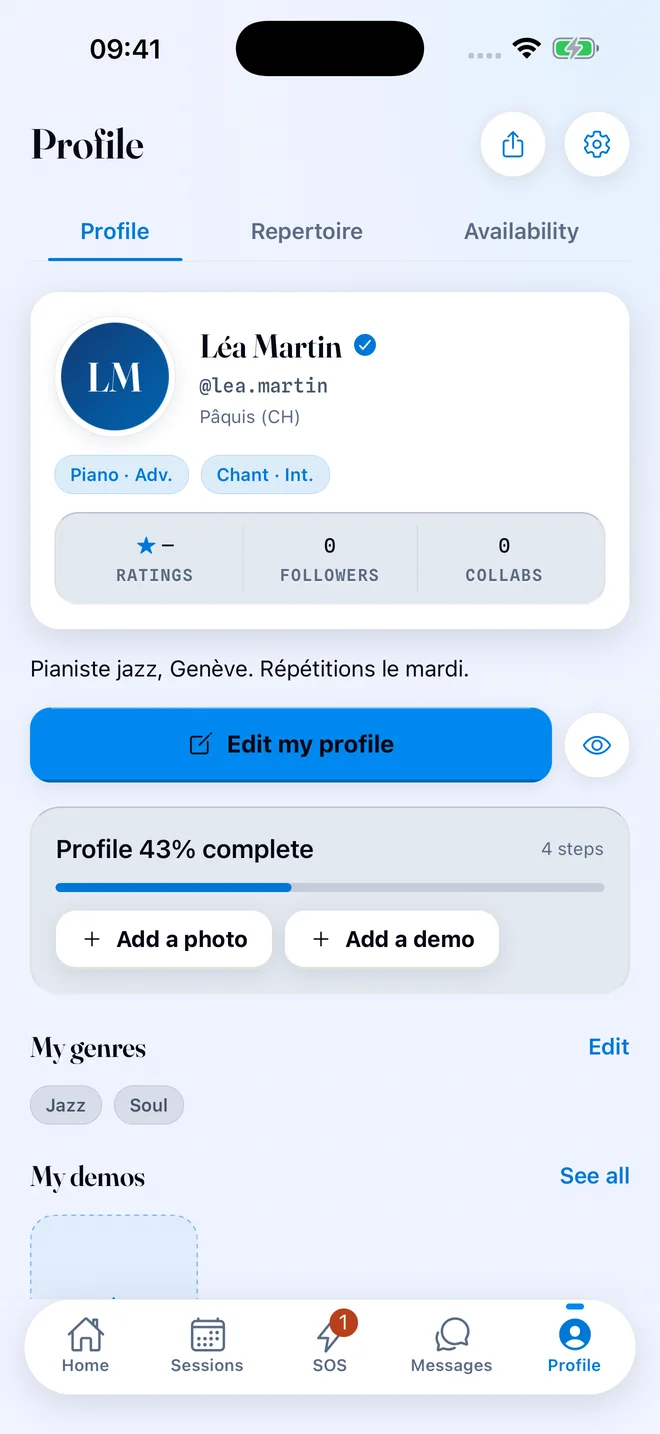
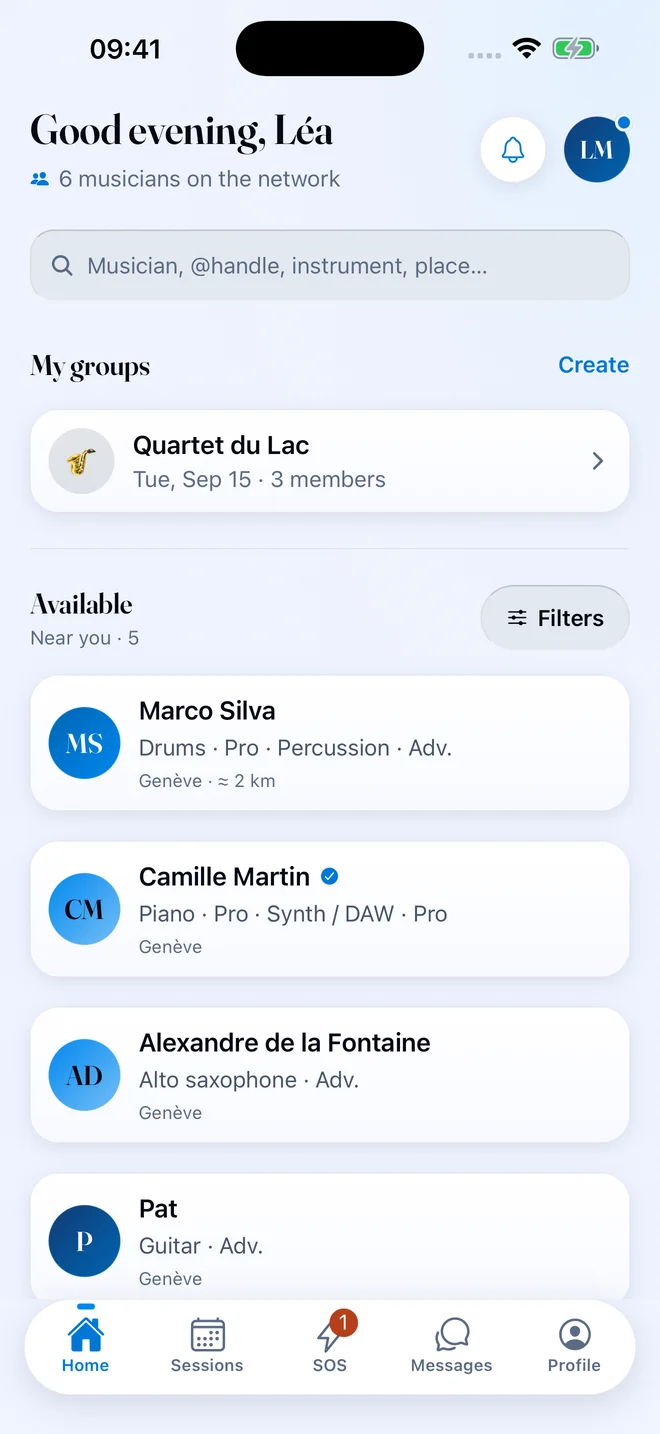
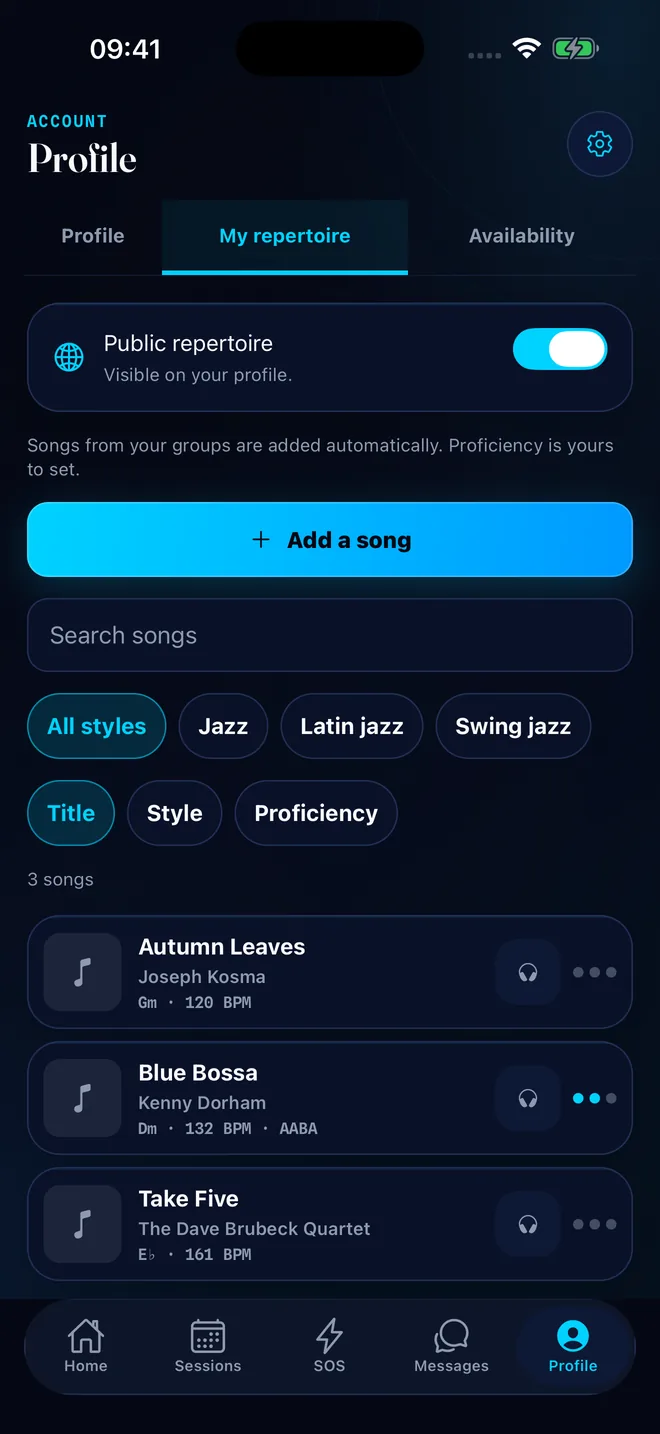
An SOS when someone is missing, with a match score for every applicant. Your band with its dates, attendance and reminders. Your repertoire with keys, tempos and shared setlists. All connected.
Invite your musicians. Up to 6 months of Premium free.
The more musicians in your city, the easier it is to find a sub. Share your link: your friend starts with 1 month of Premium, and you earn 1 month each time a friend you invited subscribes.
1 monthfor your friend
Free Premium as soon as they enter your code, no purchase and no renewal.
1 monthfor you
When your friend pays for their first month of subscription, confirmed 14 days later with no refund.
6 monthsmaximum
In total, for the whole life of your account, all free months included. Your friends always get their month.
1
Share your link
Profile → Invite a musician friend. Send your link on WhatsApp in one tap, or your 8-character code.
2
Your friend signs up
If they arrive through the link, the code is already filled in. Otherwise they enter it on the “Choose your plan” step.
3
They subscribe, you earn a month
Their month starts right away. Yours waits for you in the app once they subscribe: activate it whenever you want, nothing is charged afterwards.
1 month for your friend, 1 month for you when they subscribe.
Invite friends
Your code
K7M2QX9A
dispoapp.net/i/K7M2QX9A
Share my link
Sample code. Yours is in the app.
One code per account, to be entered within 30 days of signing up.
No self-referrals and no mutual referrals.
Already subscribed? Your month covers your next billing period: turn off renewal and it starts when your period ends.
The 3-month QR and referrals don’t stack: 3 months in total, and your referrer stays linked to your account.
One referrer per new account: no reward for an existing account or a second account.
How it works
Three tools, connected.
The SOS, the band and the repertoire share the same dates: the sub, the line-up and the setlist stay in one place until showtime.
1
Find a sub
Post an SOS: instrument, level, date and venue. Matching musicians see it with a match score, and you accept an applicant in one tap. With Express SOS, the first to accept gets the gig.
2
Run your band
Invite your musicians with a link. Gigs, rehearsals and jams with attendance, line-up, recurring dates and reminders. If someone says they can’t make it, Auto-SOS looks for a sub for their seat.
3
Share your repertoire
Your songs with key and tempo, found in the catalog. For each date, the shared setlist adds the ones everyone knows. Export as text or PDF.
In the app
Subs, bands, repertoire.
The three screens you open before every date, then your profile, which other musicians check before playing with you.
Subs
Who is available, right now.
Post an SOS or browse profiles by instrument, level, city and music school, as a list or on the map. Every applicant gets a match score: instrument, level, availability, school, styles and repertoire. “Why this match?” explains every criterion.
Express SOS: one instrument, one night, the first to accept gets the gig
37 instruments, radius up to 1000 km or anywhere
DISPO Alerts: get notified when a matching musician becomes available
Bands
Gigs, rehearsals and jams, in one place.
The leader invites musicians with a link, even without a DISPO account. Every date carries its attendance, setlist and line-up, and the band has its own conversation. When a member says they can’t make it, Auto-SOS posts an SOS for their seat.
Recurring sessions, reminders and Auto-SOS for free
Band messages with photos, videos and charts
Sync with your phone’s calendar
Repertoire
Your songs, in the right key.
Your personal repertoire is free, and your band has its own. Search the catalog for a title or artist, or type it in yourself, with its key and tempo. The shared setlist adds, in one tap, the songs every musician on the date already knows.
Setlist exported as text for WhatsApp or as a printable PDF
iReal Pro for jazz, Songsterr for rock, Tomplay for classical
Comments with replies and reactions, a note for each solo
Profile
A business card that plays.
Instruments, experience, styles, school and video demos give you useful context before you play together. The “We played together” card shows the musicians this person has already played with.
Blue Premium badge with Premium
Availability by date and time slot
15 color themes to choose from
And more
Less noise. More context.
The details that separate one more tool from a tool you keep.
Precise SOS matching
Every applicant gets a compatibility score: instrument, level, availability, school, styles and repertoire. Message them and read their profile before you accept.
Bands without a subscription
Joining a band, answering SOS requests and leaving a band whenever you want: free for everyone. Auto-SOS restarts the organizing for you.
Setlists, solos and comments
Order the songs, hand out the solos, see who suggested each title. Comments take replies and reactions; artwork hides with one setting.
Calendar sync
Your DISPO sessions are added to your phone’s calendar when you turn it on. Recurring sessions and custom reminders are included, no subscription needed.
Private and group messages
Reply to a specific message, react with an emoji, edit or delete what you sent.
Photos, videos, documents
Optimized photos, 720p videos up to two minutes, charts and files filed in the right conversation.
A moderated community
Automatic filtering of abusive content and suspension or bans for accounts that break the rules. Blue badge with Premium. SMS verification will be enabled later.
DISPO Alerts
Save your filters and get notified as soon as a matching musician says they are available. No more checking back.
Music schools
Show your school on your profile, find its students, join its community chat and filter SOS requests by school.
What’s new
What changed in the app.
DISPO moves fast. Here are the two latest versions, as they appear in Settings → What’s new.
2.12Latest version
Bring the whole band on board
Invite your band with a link: each musician can claim their place and find upcoming dates.
Find a date with a poll and keep track of each musician’s fees in one place.
Import songs from Spotify, Deezer, Apple Music or a list of titles, then prepare your setlist in stage mode, as text or as a PDF.
Choose who can see your repertoire and add the gig’s songs to find a substitute who knows them.
Offer your SOS to your trusted circle first, then open it to other musicians if needed.
Find your private chats and your band chats in a single list, and your bands on their own page from the home screen.
A catalog song picks its style by itself, and the extra links wait under “More options”.
Skip a profile step that doesn’t apply to you, like social links.
2.11
Make room for rap
Rap / MC, beatmakers and sound engineers: new instruments and genres to play together.
Listen to beats and audio attachments directly in messages and band documents.
Open your SOS requests, bands and repertoire from the home screen, with a profile to complete step by step.
An SOS shows the search in progress and confirms when a musician is coming to help.
Pricing
Free to play. A subscription to lead.
Joining bands, answering SOS requests, messaging, organizing your sessions and joining your school: all of it is free. Two monthly plans, chosen in the app, to create and lead your own bands.
Invite a friend: 1 month of Premium for them, and 1 month for you when they subscribe (up to 6 free months per account). Apple displays the price before every purchase. Subscriptions are monthly, renew automatically and can be managed in your App Store account.
The next gig can already get organized.
DISPO is free on the App Store. Create your profile in two minutes, add your songs, invite the ones you already play with and find subs around you.